I checked out the new MacBook Pros at the Apple Store. The new keyboard looks (feels) like a winner to me. It is quieter, and there’s a good chance it won’t have the same reliability problem as the prior generation. I would prefer a 15" one without the TouchBar, though, but don’t plan to buy one until my 2015 rMBP breaks or is no longer supported.
Our appointment for family photos at the park got canceled today due to heavy rain. We ended up shopping and eating pancakes instead. Not a bad trade-off for the day, but I would have liked to have the photos later.
I both love and hate articles like “The New York Yankees Are a Moral Abomination”. Handwringing, declinist arguments about baseball are almost as old as baseball itself. “Baseball is in decline” is part of its brand—part that needs to go away, I think.
Baseball is awesome. The players are very skillful, play a game that doesn’t involve hurting each other, and legitimately appear to be enjoying themselves.
I started replaying Bastion on my IPad Pro tonight. I bought it years ago and never finished it. I’m using a controller and headphones this time around, which improve the experience. I’m better at combat than I used to be, but a lot worse at the proving grounds challenges.
If I was smart, I would save $100/month for a new MacBook every 4 years or so. I am not smart.
Re-committing to Pinboard, after many months away
I’m re-committing to Pinboard, after a year or more away from it. I’m happy with what I am doing now, and thought I would document it in case anyone else wanted help understanding how to use the Pinboard effectively, especially if their usage lapsed, as mine did.
What is Pinboard?
Pinboard is an “antisocial” cloud bookmarking service. You can keep all your bookmarks there and use its barebones website or third party apps and browser extensions, all using an open API, to access them. It’s a paid service, run by a single person, with a clear and straightforward business model. When I signed up, I pre-paid for ten years of service. Part of my impetus for using it again now, after having abandoned it for, well, nothing, is the sunk-cost fallacy. The other, more important part of that impetus is that I really like the simplicity and speed of Pinboard, and I like the Pinboard iOS client I use, Pinner.
What do I use it for?
I use it for three things:
- To host my bookmarks in a cross-platform, always accessible way. I can get to the same bookmarks in Safari on my Mac and iOS, and in Chrome on Windows.
- For research and archival purposes, especially for programming projects I am working on. I can search these bookmarks on keywords, title, or description to review the best of the web pages I previously read on a topic of interest.
- As part of a homegrown “read it later” service. I can send article URLs to Pinboard from various apps, and read them later using Pinboard’s website, an app or browser extension on my Mac, and an app on iOS or Andriod.
Number 3 used to be the primary purpose of Pinboard to me. I had signed up as part of an effort to get replace Pocket with something more privacy focused. After many years of using Pocket (formerly “Read It Later”) to collect articles I was interested in from the huge stream of RSS feeds I parsed every day, I wanted a change. Primarily, this was because I became uncomfortable with Pocket’s business model: Why was it free? How did they really make money? What were they doing will all the data they collected on me?
I also wasn’t crazy about some of the UI changes made to Pocket over the years. I wanted more control over the reading experience, too, which is something that using a web service with an open API would give me. It helps that, at the time, Safari’s Reader View debuted, and I thought it was fantastic.
I was pretty obsessive about channeling all the articles I read through Pinboard, so I had a one-way workflow from discovery to reading to marking read. I never deleted anything from Pinboard, either. I thought I wanted a history of all the articles I ever read, in case I wanted to search through that history later. (Of course, I never did that.)
Why did I stop using it?
I stopped using Pinboard for three main reasons:
- I started reading Twitter more than actual articles linked to from it. The constantly updating timeline was incredibly addictive, and less mentally taxing to follow than reading complex articles from actual publications. (I have since given up Twitter because it was too addictive for me to handle responsibly.)
- My wife and I had kids, meaning that I no longer had a bunch of downtime after dinner to catch up on all the articles I had bookmarked to read later. I would still send stuff to Pinboard to read later, but I would never actually read the articles.
- My wife and I subscribed to The New Yorker, The New York Times, and The Washington Post. I started reading from those publications, from their apps, a lot more than scouring RSS feeds for articles from a dozen sources. Reading from their apps did not fit very well with my Pinboard workflow.
Overall, Pinboard became a graveyard for links I didn’t actually want to read. Instead of a useful resource, it was a junk pile full of stale content.
Digging out of a mess
I took the following steps to return Pinboard to a useful utility for me:
- I deleted everything I had in Pinboard—over 3,000 bookmarks that were doing me no good. Most of these were articles I imported from my RSS reader (Reeder) or Twitter (via Tweetbot), read once, and then just left in Pinboard.
- I installed Shiori on my MacBook Pro. Shiori is a Pinboard bookmark launcher and editor. It's like QuickSilver for Pinboard—hidden until you need it, only a keypress away, and accessible from anywhere. I set it up so that Control+Option+Command+P brings up the bookmark search window (from anywhere), and Control+Option+Command+B brings up the bookmark editor.
- I set up Pinner on iOS. Pinner is a full-featured Pinboard client. It will open Pinboard bookmarks in Safari or within Pinner, via Safari View Controller. It has two app extensions for creating bookmarks. The first extension, “Quick Pin”, has no UI, and is for quickly adding bookmarks to read later. The second extension lets you edit, interactively, all the metadata associated with the bookmark prior to saving it.
My workflow
I developed a new workflow to work with Pinboard, so I don’t end up with a mess of useless bookmarks again. Honestly, though, calling it a workflow is an exaggeration. I basically decided to manage Pinboard with a simple set of rules.
I will continue to use Pinboard both for permanent bookmarks, which mostly involve specific technical documentation about Swift and iOS development, and for a read-it-later service, which are bookmarks I want to keep around temporarily, some of which I plan to keep long term.
- Bookmarks I would keep in Safari, for sites I would log into (banking websites, personal websites, blogs, GitHub, BitBucket, etc.), are stored as private bookmarks with tags. All of these bookmarks are also tagged “Safari” so I can pull them all, as a group, with a Pinboard search.
- Bookmarks for articles to read later, and everything else, are saved with the “read later” flag set to “true”, primarily by using Pinner’s “Quick Pin” extension or the “send to Pinboard” command within Reeder (my RSS reader app of choice).
- I regularly use Pinner or Shiori to browse my “read later” list. Basically, I had to kick the Twitter habit.
- After I read articles marked “read later”, I delete the bookmark, or choose to save it. I am pretty ruthless about deleting bookmarks now, which is the opposite of how I used to be. If I don’t read something after a few days, I will just delete it.
- Rarely, I will choose to save the bookmark. If I do so, I edit the bookmark’s metadata to remove the “read later” flag and to add keywords and a description. I open copy the first paragraph of the article to the bookmark’s description field, so it’s clear to me later on why I saved it.
So far this workflow has been working well for me. I collect “read later” bookmarks throughout the day, read through them in the evening, and delete almost all of them at the end of the day. My Pinboard bookmarks list is much smaller than before, but contains only good stuff that I want to act on, either now or later.
The App Store gods are not smiling on me this week. My new app got rejected again. Now things are screwed up in a way I cannot fix. Hopefully it will all work out eventually.
SwiftoDo 2.13.2 is now available in the App Store. It fixes a Reminders import bug.
Just got an email from Apple. My new app is in review for the second time. Hopefully it doesn’t get rejected again, and I can finally launch it. 🤞
When will it not be news that people act like asshats on Twitter?
A git commit somehow disappeared, eradicating all my app code and obliterating at least one evening’s worth of work. I cracked open a Guinness, restored a backup from Arq, recovered about 80% of my work, and re-did the rest. I’m happy I didn’t lose my cool.
I found a headphone case whose brand name really gets at my peculiar affliction.
Based on this article, I predict that HBO is going to start to get a lot worse under its new ownership (AT&T). I hope I am wrong.
Salsas at my family’s favorite Mexican restaurant:
- Queso: not hot
- Verde: not hot
- Ranchero: not hot
- Guajillo: not hot
- Arbol: way too hot!
Apple’s App Review rejected my new app, primarily because its name had the word “free” in it. While that’s not the end of the world, it will delay the app’s release for at least a couple days, as I figure out a new name and the best way to handle everything in App Store Connect.
Thomas Finch’s iOS 7+ Icon Generator is a nice, little utility. It takes a square app icon and masks it to match the rounded corner shape of modern iOS icons.
I’m happy to read a favorable review of “Ant-Man and the Wasp”. I’m apt to see it because I enjoy the Marvel Universe movies and because I’ve seen the commercial for it about 15,000 times during MLB.TV baseball games.
I love Assembly by Pixite. It’s an easy to use vector drawing app for iOS. Their new icon looks nice, but I will miss their cleverly designed bird icon. Luckily, it’s still on the app’s splash screen.
I just submitted a new iOS app to the App Store tonight. My fingers are crossed when it comes to the approval process. Hopefully nothing trips it up or anything. More details to come.
SwiftoDo 2.13.1 is now available in the App Store. It fixes a reverse-sort-order bug.
I’m happy today feels like a Thursday because all day yesterday felt like a Sunday.
It is too hot and muggy to do much of anything today. My family’s trip to the beach became a trip to lunch and then back home again.
App review and package delivery are on schedule today despite the holiday. I’m not upset, but it is unexpected.
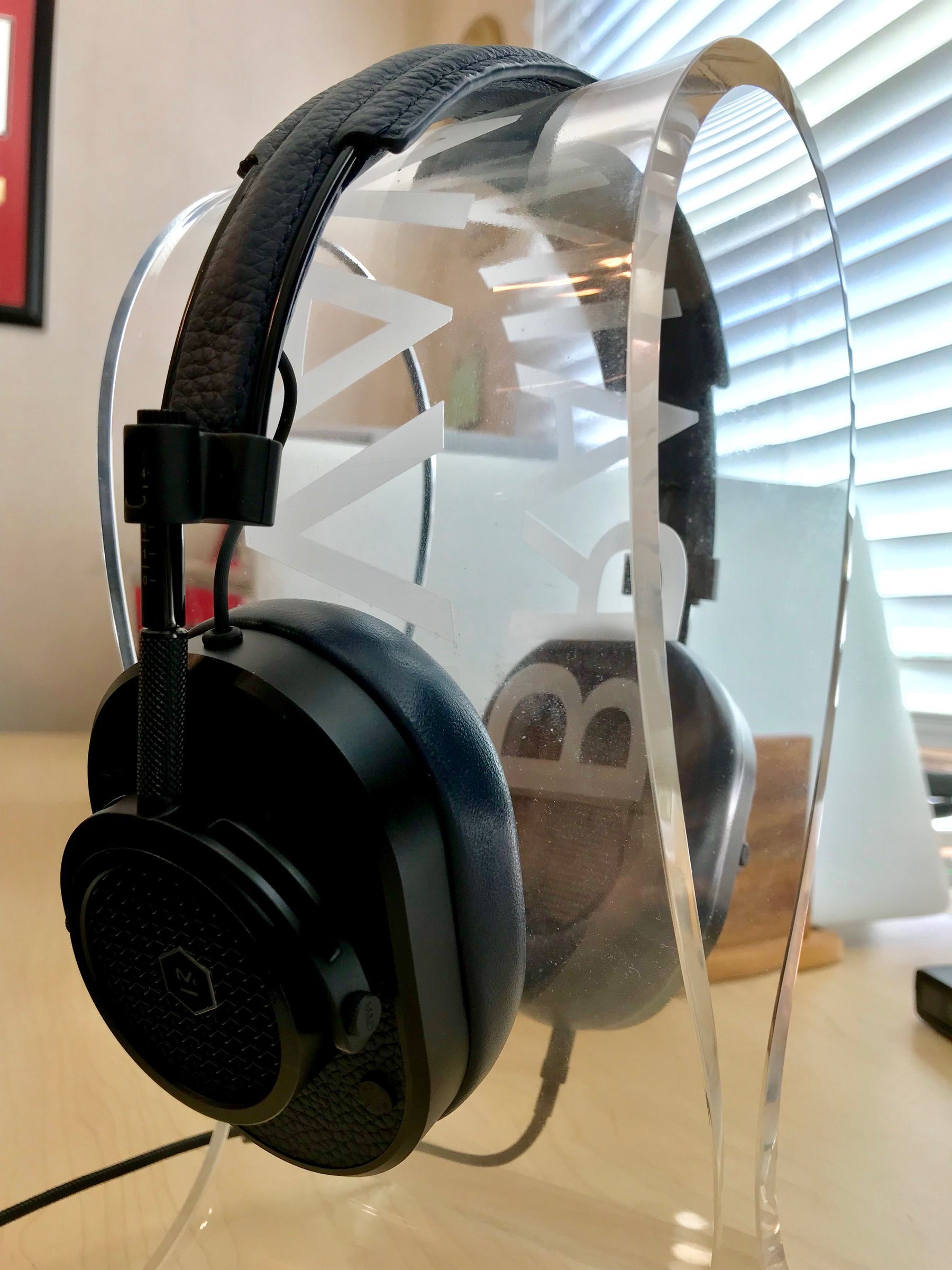
These Master & Dynamic MH40 headphones are something special: premium materials, crystal clear sound, wide soundstage, and a unique bump in the bass range that I like more than I thought I would.
Were there scads of newspaper articles published I n 1935 about the file of radio (the day’s mass media) in the rise of fascism?